Woocommerce Subscriptions
Selling subscription products? Need to track payment dates and status?
Standard order exports show the initial purchase. Not the subscription’s ongoing details.
Here’s how to export subscription numbers, status, and payment dates.
What this code exports
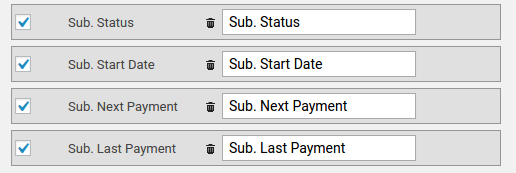
Adds five subscription columns to your order export:
- Sub. Number (the subscription ID)
- Sub. Status (active, cancelled, expired, etc.)
- Sub. Start Date (when subscription began)
- Sub. Next Payment (upcoming renewal date)
- Sub. Last Order Date (most recent order date)
Each column pulls data from the subscription itself. Not the parent order.
The complete code
|
1 2 3 4 5 6 7 8 9 10 11 12 13 14 15 16 17 18 19 20 21 22 23 24 25 26 27 28 29 30 31 32 33 34 35 36 37 38 39 40 41 42 43 44 45 46 47 48 49 50 51 |
// add status and dates as new columns class WOE_Subscription_Fields_mod { function __construct() { add_filter('woe_get_order_fields', array($this,'add_order_fields') ); add_action('woe_order_export_started', array($this,'get_subscription_details') ); add_filter('woe_fetch_order_row', array($this,'fill_new_columns'), 10, 2); } function add_order_fields($fields) { $fields['sub_number'] = array('segment'=>'cart','label'=>'Sub. Number', 'colname'=>'Sub. Number', 'value'=>'','checked'=>1); $fields['sub_status'] = array('segment'=>'cart','label'=>'Sub. Status', 'colname'=>'Sub. Status', 'value'=>'','checked'=>1); $fields['sub_start_date'] = array('segment'=>'cart','label'=>'Sub. Start Date', 'colname'=>'Sub. Start Date', 'value'=>'','checked'=>1); $fields['sub_next_payment'] = array('segment'=>'cart','label'=>'Sub. Next Payment', 'colname'=>'Sub. Next Payment', 'value'=>'','checked'=>1); $fields['sub_last_order_date'] = array('segment'=>'cart','label'=>'Sub. Last Order Date', 'colname'=>'Sub. Last Order Date', 'value'=>'','checked'=>1); return $fields; } function get_subscription_details($order_id) { $this->sub = array(); if(!function_exists('wcs_get_subscriptions_for_order')) return $order_id; if( WC_Order_Export_Data_Extractor::$object_type=='shop_order' ) { $subs = wcs_get_subscriptions_for_order($order_id, array('order_type'=>'any')); $subs = array_values($subs); if(!$subs) return $order_id; $sub = array_shift($subs); } elseif(WC_Order_Export_Data_Extractor::$object_type=='shop_subscription' ) { $sub = wcs_get_subscription($order_id); } else { return $order_id;// unknow type } $this->sub['number'] = $sub->get_id(); $this->sub['status'] = $sub->get_status(); //$this->sub['start_date'] = $sub->get_date_to_display("start_date"); //was $this->sub['start_date'] = date_i18n( wc_date_format(), $sub->get_time( 'date_created', 'site' ) ); $this->sub['next_payment'] = $sub->get_time( 'next_payment_date', 'site' ) ? date_i18n( wc_date_format(), $sub->get_time( 'next_payment_date', 'site' ) ) : '-'; $this->sub['last_order_date'] = date_i18n( wc_date_format(), $sub->get_time( 'last_order_date_created', 'site' ) ); return $order_id; } // add new values to row function fill_new_columns($row,$order_id) { foreach($this->sub as $k=>$v) if(isset($row['sub_'.$k])) $row['sub_'.$k] = $v; return $row; } } new WOE_Subscription_Fields_mod(); |
Setup steps
- Copy the entire code block
- Paste into your theme’s
functions.php - Go to Advanced Order Export for WooCommerce
- Create or edit an export profile
- Open Setup Fields → Cart
- You’ll see subscription fields. Check the ones you need
- Save and test on a subscription order
What your export looks like
| Order # | Product | Sub. Number | Sub. Status | Sub. Start Date | Sub. Next Payment | Sub. Last Order Date |
|---|---|---|---|---|---|---|
| 1001 | Monthly Plan | #SUB-123 | active | 2026-01-15 | 2026-06-15 | 2026-05-15 |
| 1002 | Yearly Plan | #SUB-456 | cancelled | 2026-02-01 | – | 2026-04-01 |
When you need this
You sell subscriptions. Need to track which customers are active.
Your support team needs next payment dates for billing inquiries.
You run reports on subscription status (active vs cancelled).
You reconcile payments. Need last order date for each subscription.
How it works
The code finds the subscription linked to your order. Uses WooCommerce Subscriptions functions:
wcs_get_subscriptions_for_order()finds subscriptions by order IDwcs_get_subscription()gets subscription by ID
Then pulls key dates and status. Formats them for your export.
Two export scenarios
Exporting a regular order: The code finds the associated subscription. Shows its details.
Exporting a subscription (direct object): The code treats the subscription itself as the export. Shows its own details.
Common mistake
The code requires WooCommerce Subscriptions plugin. Function wcs_get_subscriptions_for_order() must exist.
Also, subscriptions must be active. A cancelled subscription still exports. But shows “cancelled” status.
Empty or incorrect dates?
No next payment? Subscription is cancelled or expired. The code shows “-” instead.
Wrong date format? Change wc_date_format() to your preferred format: 'Y-m-d' or 'm/d/Y'.
Pro tip
Need subscription end date? Add a field:
|
1 |
$fields['sub_end_date'] = array('segment' => 'cart', 'label' => 'Sub. End Date', 'colname' => 'Sub. End Date', 'checked' => 1); |
Then in get_subscription_details():
|
1 |
$this->sub['end_date'] = $sub->get_time('end_date', 'site') ? date_i18n(wc_date_format(), $sub->get_time('end_date', 'site')) : '-'; |
Need trial end date? Use trial_end_date instead.
Real talk
WooCommerce Subscriptions stores subscription data separately from orders. A single subscription can have many orders (renewals).
This code finds the right subscription. Pulls the current status and key dates.
Your customer support team gets complete subscription visibility. No more clicking through multiple order screens. One export shows everything they need.