Sample Addons
This section is for programmers and PRO version is not required.
The Sample Addons are fully functional, standalone WordPress plugins that demonstrate how to create custom output formats for Advanced Order Export. You can use them as-is or, more commonly, as a template that you modify to meet your exact specifications.
Each addon is a complete plugin that you install via Plugins → Add New → Upload in your WordPress admin. Once installed and activated, the addon adds a new option to your export profile’s Output Type dropdown, allowing you to select your custom format alongside the built‑in options (CSV, XLS, JSON, XML).
Please, use these plugins as a start point.
Custom JSON format
Custom XML format
Custom CSV format
Product Feed CSV
Available Sample Addons
| Addon File | Output Format Created |
|---|---|
woe-custom-json.zip | Exports order data in a fully customisable JSON structure. |
woe-custom-xml.zip | Generates XML output with your own schema, attributes, and nesting rules. |
woe-custom-csv.zip | Produces CSV files with custom delimiters, enclosures, and line endings – perfect for legacy system compatibility. |
woe-product-feed-csv.zip | Creates product feed CSV files optimised for Google Shopping, Facebook Catalog, or other merchant centres. |
All addons are available for immediate download from our documentation page.
Installation and Activation
Installing a Sample Addon follows the same process as any other WordPress plugin:
- Download the desired addon ZIP file from the documentation page.
- In your WordPress admin, navigate to Plugins → Add New → Upload Plugin.
- Click “Choose File”, select the downloaded ZIP, and click “Install Now”.
- After installation, click “Activate Plugin”.
Important: Check the Activation Box
Once the addon is activated, you have one more step. Open your export profile (WooCommerce → Advanced Order Export) and scroll to the bottom of the page. You will see a new checkbox titled “Activate Custom Format” or similar.
You must check this box for the custom output format to appear in your export profile’s Output Type dropdown. This extra step ensures that the addon does not interfere with your existing export jobs until you explicitly enable it.
Editing the Code
The Sample Addons are designed to be modified. After installation, you can edit the plugin files directly using FileZilla (or any SFTP/FTP client) and your preferred code editor.
Key files to look for within each addon:
| File | Purpose |
|---|---|
woe-custom-format.php | The main plugin file. Contains the hook registrations and the class definition. |
class-woe-custom-format.php | The core formatting logic. This is where you modify the output structure. |
Because these are standalone plugins, your modifications will not be overwritten when you update Advanced Order Export. However, if you later update the Sample Addon itself, you will lose your changes – so I strongly recommend renaming the addon or keeping a backup of your modifications.
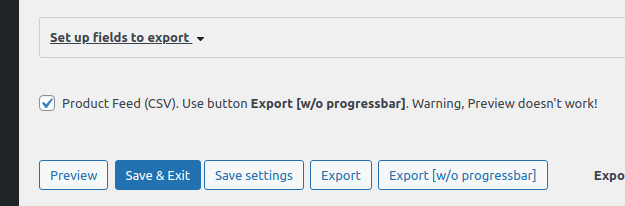
To activate functionality – you should mark checkbox at the bottom of the page!