Columns for each currency
Run a multi-currency store? One order in USD. Another in EUR. A third in GBP.
Standard exports mix all currencies together. Your accounting software gets confused.
This solution creates separate columns for each currency. USD totals go in one column. EUR in another. Clean and simple.
Get the plugin
Download the multi-currency columns plugin from the link.
This plugin was originally coded for classiccarbs.co.uk. They kindly allowed public release. Thanks to them.
What it does
The plugin detects which currencies appear in your export. It creates dedicated columns for:
- Order total in each currency
- Shipping total per currency
- Tax amounts per currency
- Refund amounts per currency
No more mixed columns. No manual conversion.
Installation
- Download the ZIP file
- Go to Plugins → Add New in WordPress
- Click Upload Plugin
- Choose the ZIP file
- Click Activate
Works alongside Advanced Order Export for WooCommerce. No conflicts.
Setup
Open your export profile. Go to Setup Fields. You’ll see new field groups:
- Order Totals by Currency
- Shipping by Currency
- Taxes by Currency
Check the columns you need. Save the profile.
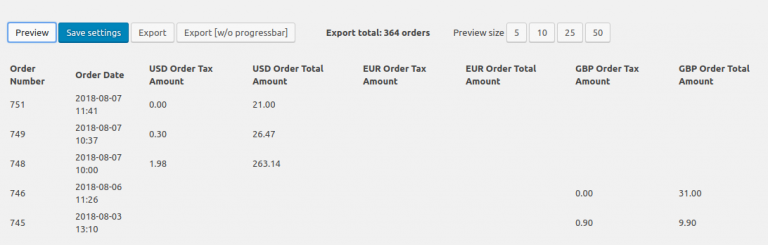
Run an export. Each currency gets its own column.
Real example
Your store accepts USD, EUR, and GBP.
| Order # | Order Total USD | Order Total EUR | Order Total GBP |
|---|---|---|---|
| 1001 | $150.00 | €125.00 | |
| 1002 | €75.00 | £65.00 | |
| 1003 | $200.00 |
Empty cells mean that order didn’t use that currency.
When you need this
You sell internationally. Multiple currencies active.
Your accountant needs separate columns for tax reporting.
You reconcile payments across different currency gateways (Stripe, PayPal, etc.).
You run multi-currency reports in external software like QuickBooks or Xero.
Common mistake
Forgetting that WooCommerce stores amounts in the shop’s base currency. This plugin converts on the fly. It needs exchange rates from your multi-currency plugin.
Make sure your currency plugin (WooCommerce Currency Switcher, Aelia, etc.) is active. The plugin pulls rates from there.
Pro tip
Don’t export all currency columns at once. Export slows down. Pick only the currencies you actually use.
Test with 10 orders first. Verify the amounts match your payment gateway reports.
Troubleshooting
Empty columns? Your order didn’t use that currency. That’s normal.
Wrong amounts? Check your exchange rate settings. The plugin uses current rates, not historical ones.
Plugin not showing? Deactivate and reactivate Advanced Order Export for WooCommerce first. Then install this plugin.
If you run multi-currency, grab this plugin. Your finance team will thank you.