Export orders based on delivery date
Need tomorrow’s delivery list? Or next week’s batch?
Standard WooCommerce exports use order date. Not helpful when customers schedule future delivery.
Here’s how to filter by delivery date instead.
Find your delivery field name
Delivery plugins store the date in order meta. Common names:
- “Delivery Date”
- “delivery_date”
- “_delivery_date”
- “pickup_date”
Check your order edit screen. Look for the custom field. Note the exact name.
Step 1: Set up the filter
Open your export profile in Advanced Order Export for WooCommerce.
Go to Filter by order section.
First dropdown: Choose your delivery field (or type the meta key)
Second dropdown: Select “=”
Third field: Type {tomorrow} (yes, with curly brackets)
Click the plus button to add the filter.
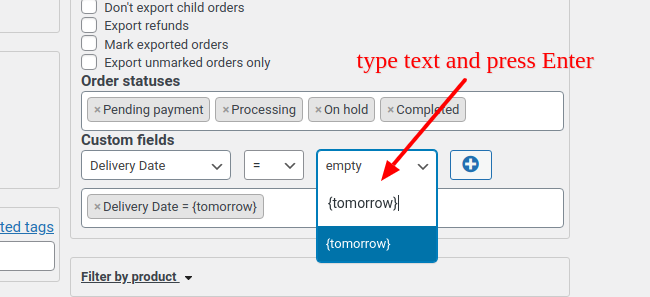
Step 2: Add the date replacement code
Go to Misc Settings. Paste this code:
|
1 2 3 4 5 6 7 8 |
// replace {tomorrow} with actual values comparison operators add_filter('woe_settings_validate_defaults', function ($settings) { $settings = json_encode($settings); // to string $tomorrow = date("Y-m-d" , strtotime("+1 day", current_time( 'timestamp' ) )); // EDIT? $settings = str_replace( '{tomorrow}', $tomorrow, $settings); $settings = json_decode($settings, true); // to array return $settings; } ); |
This replaces {tomorrow} with the actual date. Today is May 18. Code puts May 19.
Step 3: Match the date format
Critical step. Your delivery plugin might use a different format.
Common formats:
Y-m-d→ 2026-05-19m/d/y→ 05/19/26j F, Y→ 19 May, 2026
Change the date() line. Edit "Y-m-d" to match your plugin.
Example for US format: $tomorrow = date("m/d/y" , strtotime("+1 day"))
Test it
Run the export. Check if orders with tomorrow’s delivery appear.
Empty result? Format mismatch. Check an existing order’s delivery date value. Copy that exact format.
Export next week instead
Change +1 day to +7 days. Or +14 days. Works for any offset.
Special case: Local Pickup Plus
This plugin stores dates differently. Use this code instead:
|
1 2 3 4 5 6 7 8 9 |
add_filter('woe_settings_validate_defaults', function($settings){ $date = date("Y-m-d" , strtotime("+1 day", current_time( 'timestamp' ) )); // EDIT? $settings["item_metadata"]= array("shipping:_pickup_appointment_start LIKE " .$date ); return $settings; }); add_filter("woe_sql_get_order_ids", function($sql,$settings){ $sql = str_replace("meta_1.meta_value ", "FROM_UNIXTIME(meta_1.meta_value , '%Y-%m-%d')", $sql); return $sql; },10,2); |
Local Pickup Plus uses Unix timestamps. This converts them to readable dates before comparing.
Common mistake
Forgetting the curly braces. {tomorrow} not tomorrow. The code looks for exact brackets.
Also, timezone issues. current_time('timestamp') uses WordPress timezone. Make sure your site timezone matches your delivery expectations.
Pro tip
Export multiple days at once. Use BETWEEN operator instead of =. Type {tomorrow} and {next_week}.
Add another code snippet for {next_week}. Copy the pattern.
Real example
You run a flower shop. Customers order today for tomorrow delivery.
Set up this filter. Run the export at 5 PM. Get complete list of tomorrow’s deliveries. Send to your driver.
No manual checking. No missed orders.
Troubleshooting
Nothing exports? Check the actual meta key name. Use a plugin like Custom Fields Finder. Get the exact spelling.
Wrong orders appear? Date format mismatch. Export one order. See what your delivery plugin stores. Match that format exactly.