Hooks/Filters
Need to change how data appears? Add prefixes to order numbers? Reformat weights? Hooks let you modify any column before it exports. No need to change your WooCommerce data.
How Hook Names Work
Hook names follow a simple pattern:
- Order fields –
woe_get_order_value_FIELD - Product fields –
woe_get_order_product_value_FIELD - Coupon fields –
woe_get_order_coupon_value_FIELD
Replace FIELD with your actual column name.
Finding the Field Name
Two ways to find the right FIELD name:
- Use Setup fields – Hover over any field. A tooltip shows the field key.
- Switch to JSON format – Field names appear in the export preview.
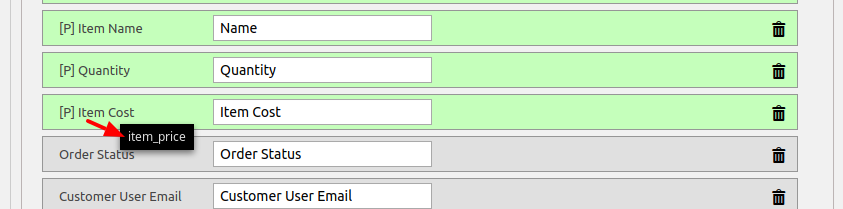
Order Field Example – Pull First Name from User Meta
Default export shows billing first name. Want the WordPress profile first name instead?
|
1 2 3 4 |
add_filter('woe_get_order_value_first_name', function($value, $order, $fieldname) { $user_id = $order->get_user_id(); return get_user_meta($user_id, 'first_name', true); }, 10, 3); |
Parameters: $value, $order (WC_Order object), $fieldname (string)
Product Field Example – Format Weight to 3 Decimals
0.2 becomes 0.200. 0.12 becomes 0.120.
|
1 2 3 |
add_filter('woe_get_order_product_value_weight', function ($value, $order, $item, $product, $item_meta) { return number_format($value, 3, '.', ''); }, 10, 5); |
Parameters: $value, $order, $item, $product, $item_meta (array)
Coupon Field Example – Add Prefix to Coupon Code
|
1 2 3 |
add_filter('woe_get_order_coupon_value_code', function ($value, $order, $item) { return "WC-" . $value; }, 10, 3); |
Skip Orders Based on Conditions
It’s possible to skip order using filter woe_order_export_started
|
1 2 3 4 5 6 |
// export only orders with total > 10 add_filter( 'woe_order_export_started', function ( $order_id ) { $order = new WC_Order($order_id); return ($order->get_total() > 10.00) ? $order_id: false; }); |
This example exports only orders over $10. Return false to skip the order.
Format Final Output for Specific Formats
Modify the entire export before it’s written to file.
Available filters:
woe_xls_output_filter– for Excel fileswoe_csv_output_filter– for CSV fileswoe_xml_output_filter– for XML fileswoe_json_output_filter– for JSON files
Example – Add XML namespace to all tags:
|
1 2 3 4 5 6 7 8 |
Example: we add namespace "ns2:" to all tags add_filter( 'woe_xml_output_filter', function( $xml, $rec ) { // for <test> $xml = preg_replace( '/(?<=<)([^/].*?)(?=>)/', 'ns2:$1', $xml); // for </test> $xml = preg_replace( '/(?<=</)(.*?)(?=>)/', 'ns2:$1', $xml); return $xml; } , 10, 2); |
Where to Put These Hooks
Add to your theme’s functions.php file. Or use a code snippet plugin.
Important: Enable “Custom PHP code to modify output” in Misc Settings for most hooks to work.
Real Talk
Advanced Order Export for WooCommerce hooks give you unlimited flexibility. No data is stuck in its original format.
Need customer names in ALL CAPS? Hook it. Need order numbers with “PO-” prefix? Hook it. Need to skip orders under $10? Hook it.
Start with one simple modification. Build from there. Your exports will look exactly how you want.