Misc Settings
The “Misc Settings” section in Advanced Order Export for WooCommerce controls how your data gets processed. These options can save you hours of cleanup.
Let’s go through each setting.
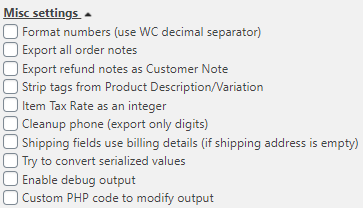
Number Formatting
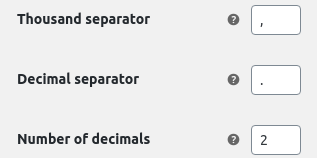
Format numbers (use WC decimal separator). Use number formatting of the report. The value of the separator is specified in the module “WooCommerce” – “Settings” – “General”
Notes Export
Export all orders notes. Turn on this checkbox for exporting orders notes.
Export refund notes as Customer Note. Turn on this checkbox, if the customer returned the product and left a comment.
Note: don’t forget to add the “Customer Note” field in the “Set up fields” block.
HTML and Text Cleaning
Strip tags from Product Description/ Variation. Turn on this option, if you specified the product description using HTML tags, and you do not want the tags to be displayed in the report.


Tax and Phone Formatting
Item Tax Rate as an integer. Show the tax rate without decimals in your report.
Clean up phone. Displaying only digits of the phone numbers (without “+” and “-” signes, e.g.).
Address Fallback
Shipping fields use billing details. Fill in the empty shipping address field by the address from the billing.
Serialized Data
Try to convert serialized values. This option uses for converting serialized values from database. Look at the example below:
Debugging
Enable debug output. Turn on this checkbox if you need to display the SQL query of the report and errors. For example:
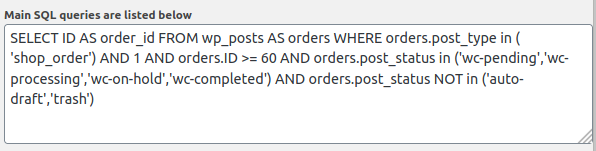
Note: If you want to see all the error logs that occurred while working with the “WooCommerce” plugin, go to the” WooCommerce ” – “Status” – “Logs” section and review last “fatal-error-xx.log” file.
Custom PHP Code
Custom PHP code. Create a report with arbitrary parameters. Check the options for using this parameter here:
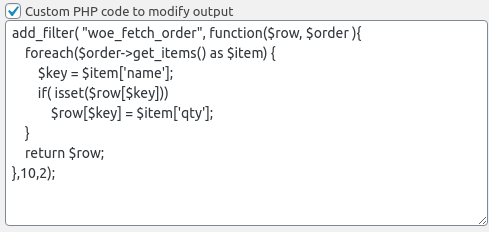
This code creates dynamic columns. Each product name becomes a column header. Product quantity becomes the value.
Pro Tip
Enable debug output when testing new exports. See exactly what’s happening. Turn it off for production exports to keep logs clean.
Common Mistake
Forgetting to add “Customer Note” field when exporting refund notes. The option does nothing without that field in your export setup.
Real Talk
Advanced Order Export for WooCommerce misc settings solve real problems. Clean phone numbers for your CRM. Strip HTML for plain text reports. Use billing address as fallback for missing shipping data.
Enable only what you need. Each option has a purpose. Test one at a time. Build your perfect export.