System
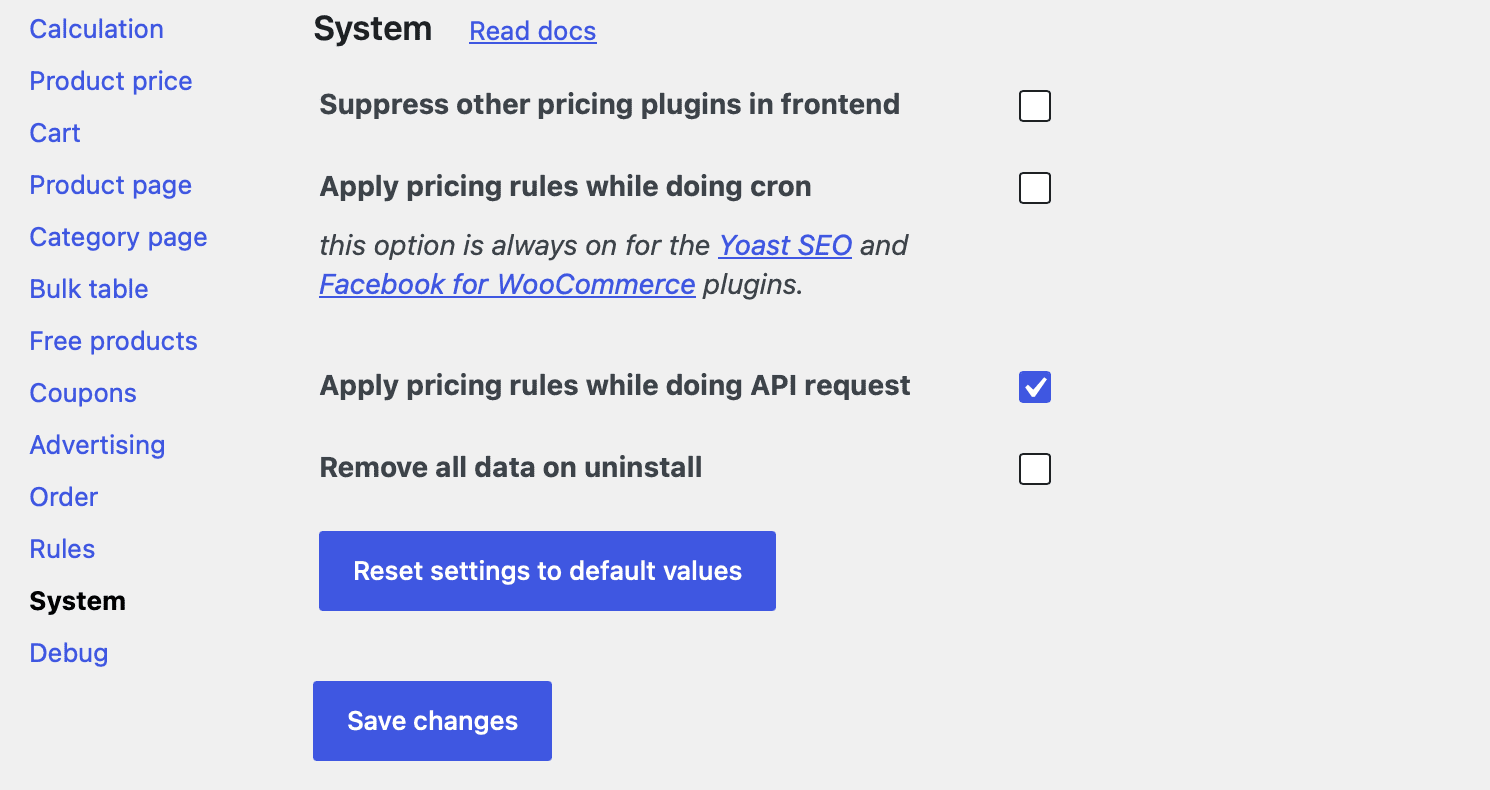
The System tab in Advanced Dynamic Pricing for WooCommerce contains global settings that control how the plugin interacts with the rest of your WooCommerce environment — other pricing plugins, backend order tools, scheduled tasks, REST API requests, and what happens when you uninstall it. You’ll find these settings at Advanced Dynamic Pricing → Settings → System.
Most stores won’t need to touch these settings after initial setup, but understanding what each one does helps you configure third-party plugin integrations correctly and avoid unexpected pricing behaviour in non-standard WooCommerce workflows.
Suppress Other Pricing Plugins in Frontend
When you turn this setting ON, Advanced Dynamic Pricing registers its price filters at the highest possible priority — effectively running last among all plugins that modify WooCommerce prices on the front end. This ensures the plugin’s calculated prices always take precedence over other pricing plugins that may also hook into woocommerce_get_price, woocommerce_get_price_html, and related filters.
Turn this ON when Advanced Dynamic Pricing’s prices don’t appear because another pricing plugin overwrites them. Turn it OFF when you use a compatible third-party pricing plugin alongside Advanced Dynamic Pricing and want both to run cooperatively — several compatibility integrations in this documentation explicitly require this setting to stay off. See the Available Plugins Compatibility page for details.
Allow to Edit Prices in Phone Orders
This setting enables compatibility with the Phone Orders for WooCommerce plugin, which lets store staff create backend orders on behalf of customers — useful for telephone orders, trade account management, and manual order entry.
The standard WooCommerce backend order flow (WooCommerce → Orders → Add Order) writes records directly to the database and bypasses WooCommerce’s pricing hooks entirely, so Advanced Dynamic Pricing rules never fire for manually created orders. With this setting ON and Phone Orders installed, staff-created orders run through the plugin’s full pricing engine, so all active rules — role discounts, bulk tiers, cart conditions — apply correctly to backend orders just as they would on the storefront.
Turn this ON only if you use the Phone Orders plugin. Leaving it on without Phone Orders installed has no effect.
Apply Pricing Rules While Doing Cron
WordPress and WooCommerce run scheduled background tasks via WP-Cron — generating product feeds, syncing inventory, sending automated emails, and more. By default, Advanced Dynamic Pricing does not apply its pricing rules during cron executions to avoid affecting background data processing with front-end discount logic.
Turn this setting ON when a cron-driven plugin or process needs to read WooCommerce prices that reflect your active pricing rules. The most common example is a product feed plugin that runs on a schedule and needs to export the discounted prices rather than the raw database prices.
Note: This setting is always ON automatically for Yoast SEO and Facebook for WooCommerce. Both plugins generate product data during cron runs that benefits from reflecting the current discounted prices, so Advanced Dynamic Pricing always applies rules for those two plugins regardless of this setting’s state.
Apply Pricing Rules While Doing API Requests
WooCommerce exposes a REST API that external systems use to read product and order data — headless storefronts, mobile apps, ERP integrations, and third-party marketplaces. By default, Advanced Dynamic Pricing does not apply pricing rules during API requests, so the API returns the raw database prices rather than dynamically calculated ones.
Turn this setting ON when an external system or headless frontend queries the WooCommerce REST API and needs to receive prices that reflect your active pricing rules. Keep it OFF if your API integration needs consistent raw prices unaffected by promotional rules — for example an inventory system that should always see base prices regardless of active promotions.
Remove All Data on Uninstall
When you turn this setting ON and then uninstall Advanced Dynamic Pricing, the plugin permanently deletes everything it stored in your database — all rules, all settings, all discount application history, and any plugin-specific options. This leaves your database clean with no orphaned data after removal.
When this setting stays OFF (the default), the plugin’s data persists in the database after uninstallation. Your rules and settings survive a reinstall — the plugin picks them up exactly where you left off.
⚠️ Turning this setting ON before uninstalling is irreversible. All rules and settings delete permanently with no recovery option. Always export your rules via the Backup Tool before uninstalling if you may want to restore them later.
Reset All Settings to Default
At the bottom of the System tab sits the “Reset all settings to the default” button. Clicking it wipes every setting across all Advanced Dynamic Pricing settings tabs — Calculation, Product Price, Cart, Product Page, Category Page, Bulk Table, and System itself — and restores them all to their factory defaults in a single action.
This button does not delete your pricing rules. Your rules list stays completely intact after a reset. Only the plugin’s configuration settings change.
Use this button when a misconfigured setting causes unexpected behaviour across your store and you can’t identify which setting causes it, or when you want to start fresh with a clean configuration after experimenting with settings during initial setup. It also helps when working with support — resetting to defaults rules out custom settings as the source of a problem before deeper investigation begins.
⚠️ A settings reset is immediate and irreversible. The plugin applies the default values the moment you click the button with no confirmation prompt. If you’ve spent time fine-tuning your settings, note them down or take a screenshot before clicking — there is no undo. Your pricing rules remain safe, but all configuration changes you’ve made across every settings tab will disappear.
Settings Summary
| Setting | Default | Turn ON when… |
|---|---|---|
| Suppress other pricing plugins in frontend | OFF | Another plugin overwrites Advanced Dynamic Pricing’s prices on the front end |
| Allow to edit prices in Phone Orders | OFF | You use the Phone Orders for WooCommerce plugin for backend order creation |
| Apply pricing rules while doing cron | OFF | A scheduled process or feed plugin needs to read discounted prices |
| Apply pricing rules while doing API requests | OFF | An external system or headless frontend queries the WooCommerce REST API and needs live rule-calculated prices |
| Remove all data on uninstall | OFF | You want a clean database removal with no data left behind |