How to activate PRO version license
After purchasing Advanced Dynamic Pricing for WooCommerce PRO, you need to activate your license key to unlock all PRO features, receive automatic plugin updates, and access priority support. The whole process takes under two minutes. This article walks through every step — from finding your license key to verifying a successful activation.
Before You Start
Make sure you have the following ready:
- An active purchase of Advanced Dynamic Pricing for WooCommerce PRO
- Access to your Algol+ account where your license key lives
- The PRO plugin installed and activated on your WordPress site (see below if you haven’t done this yet)
Step 1 — Install the PRO Plugin
If you already have the free version of Advanced Dynamic Pricing active on your site, you don’t need to remove it first. The PRO version installs alongside it and takes over automatically.
- Log in to your Algol+ account.
- Go to Downloads and download the latest PRO plugin zip file.
- In your WordPress admin, go to Plugins → Add New → Upload Plugin.
- Select the zip file you downloaded and click Install Now.
- Click Activate Plugin once the installation completes.
⚠️ If you run into any issues during installation, the PRO version troubleshooting guide covers the most common problems and their solutions.
Step 2 — Find Your License Key
- Log in to your Algol+ account.
- Go to the Licenses section.
- Copy the license key for Advanced Dynamic Pricing for WooCommerce PRO.
Your license key is a long alphanumeric string. Keep it in a safe place — you’ll need it again if you ever reinstall the plugin or activate it on a different site.
Step 3 — Activate the License
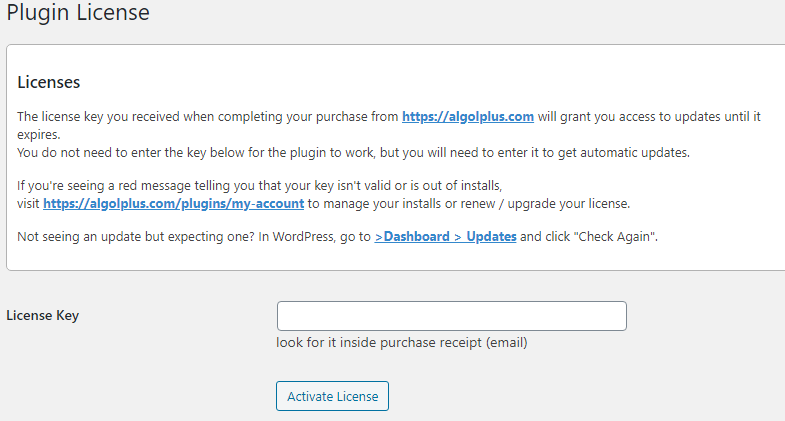
- In your WordPress admin, go to Advanced Dynamic Pricing → License.
- Paste your license key into the text input field.
- Click Activate License.
- The page refreshes and displays your license status. A green confirmation message confirms the activation was successful.
Once the license activates, all PRO features unlock immediately — no restart or cache clearing is required.
License Status Reference
After activation, the License tab shows the current status of your license. Here’s what each status means:
| Status | Meaning |
|---|---|
| Active | License is valid and all PRO features are enabled. Automatic updates are active. |
| Expired | Your license period has ended. PRO features continue working but automatic updates stop until you renew. |
| Invalid | The license key doesn’t match any active purchase. Double-check the key or contact support. |
| Site limit reached | You’ve activated the license on the maximum number of sites your plan allows. Deactivate it on another site first, or upgrade your license tier. |
Managing Licenses Across Multiple Sites
Each license tier covers a set number of site activations. If you move your store to a new domain or want to use the plugin on an additional site, deactivate the license on the old site first to free up an activation slot.
To deactivate a license from a site, go to Advanced Dynamic Pricing → License on that site and click Deactivate License. You can then activate it on a different site using the same key.
Automatic Updates
With an active license, Advanced Dynamic Pricing PRO delivers updates directly through the standard WordPress update mechanism. When a new version releases, a notification appears in Dashboard → Updates just like any other plugin update. Click Update Now to install it.
⚠️ Always back up your site and export your current rules via the Backup Tool before applying a major plugin update, in case you need to roll back.