Cart/Shipping Discount

The Cart/Shipping Discount section lets you attach cart-level adjustments to any pricing rule — applying discounts, fees, shipping changes, coupons, payment restrictions, or tax exemptions automatically whenever the rule fires. Unlike product discounts that modify individual item prices, these adjustments affect the cart total, shipping costs, or checkout behaviour as a whole.
You can add as many adjustments as you need to a single rule by clicking “Add cart adjustment” repeatedly. PRO-only options are marked with * throughout this page.
1. Discount Group
This group reduces the cart total or shipping cost when the rule fires.
Fixed discount, once subtracts a set amount from the cart subtotal a single time, regardless of how many products triggered the rule. Use this for flat order-level promotions like “£10 off any order”.
Add fixed discount on each rule execution [PRO] applies the fixed discount amount once for every time the rule fires within the cart. If the same rule applies to three different products in the cart, the discount fires three times.
Add fixed discount to each item line affected by rule [PRO] applies the fixed discount once for every cart line item the rule affects — useful when you want the discount to scale with the number of distinct products the customer adds.
Percentage discount reduces the cart subtotal by a percentage, applied once to the total. This is the standard “10% off your order” setup.
Percentage discount shipping [PRO] applies a percentage reduction to the shipping cost rather than the product subtotal. Use it for promotions like “20% off shipping on orders over £50”.

2. Fee Group
This group adds a surcharge to the order when the rule fires — useful for handling fees, service charges, or conditional cost additions.
Fixed fee, once adds a set amount to the order total a single time. A typical use case is a small handling fee for orders that include fragile items from a specific category.
Add fixed fee on each rule execution [PRO] adds the fee amount once per rule execution — if the rule fires multiple times (for multiple matching products), the fee adds up accordingly.
Add fixed fee to each item line affected by rule [PRO] adds the fee for each individual cart line item the rule touches, making it suitable for per-item surcharges like a personalisation fee on custom-engraved products.
Percentage fee [PRO] adds a percentage-based charge to the order total once. For example, a 2% processing fee on orders from specific countries.
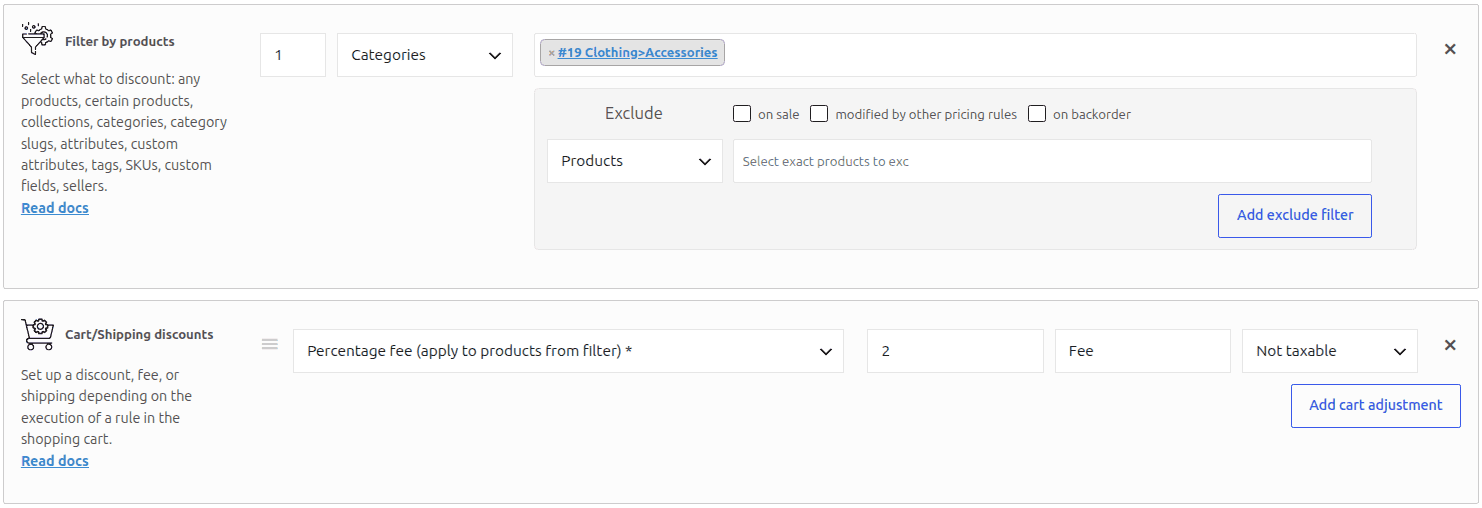
Percentage fee (apply to products from filter) [PRO] calculates the percentage fee against only the subtotal of the products matched by the rule’s product filter — not the entire cart. Use this when you need a surcharge that applies only to a subset of cart items, for example a 5% handling fee that applies only to accessories rather than the full order value.
3. Shipping Group
This group modifies shipping method availability and cost when the rule fires.
Set zero cost for all shipping methods makes every available shipping method free — a quick way to implement free shipping without creating a dedicated WooCommerce free shipping method.
Fixed discount shipping [PRO] lets you reduce the cost of specific shipping zones by a fixed amount. Configure the discount per zone for fine-grained control over which shipping options receive the reduction.
Fixed shipping price [PRO] overrides the cost of a specific shipping zone entirely, replacing whatever the shipping zone normally charges with a fixed price you define.
Allow Free Shipping [ADP] [PRO] activates the dedicated Free Shipping [ADP] shipping method that Advanced Dynamic Pricing adds to WooCommerce. This method stays hidden from customers by default and only becomes available at checkout when a rule with this adjustment fires. To use it, first create the Free Shipping [ADP] shipping method under WooCommerce → Settings → Shipping, then reference it here in your rule.

Disable shipping method [PRO] removes a specific shipping method from the checkout options when the rule fires — useful for restricting certain shipping methods to specific customer groups, order sizes, or product combinations.
4. Coupons Group [PRO]
This group manages WooCommerce coupon behaviour at checkout when the rule fires.
Apply WC coupon [PRO] automatically applies an existing WooCommerce coupon to the cart without the customer entering a code. Select any coupon you’ve created in WooCommerce and the rule applies it silently when its conditions pass — a clean way to give loyalty discounts or member pricing without exposing a coupon code.
Disable all WC coupons [PRO] prevents customers from applying any WooCommerce coupon while the rule is active. Use this to prevent coupon stacking with other promotions.
Disable WC coupon [PRO] blocks specific named coupons from being applied. Select one or more existing coupons and they become unavailable at checkout whenever the rule fires — useful for preventing specific discount combinations.
5. Payment Group
Disable payment methods removes one or more payment methods from the checkout payment selector when the rule fires. Select any registered WooCommerce payment gateway to hide it for orders that match the rule’s conditions. Common use cases include restricting cash on delivery to orders below a certain value, or disabling specific gateways for certain product categories.
6. Tax Group [PRO]
Tax exempt [PRO] applies full tax exemption to the order when the rule fires. Use this for B2B rules where registered business customers qualify for tax-free pricing, or for rules that target product categories carrying zero-rate tax obligations.
Combining Multiple Adjustments
A single rule can carry any number of cart adjustments simultaneously. Click “Add cart adjustment” at the bottom of the section to stack additional adjustments on the same rule. For example, a single rule could apply a percentage discount to the cart, enable free shipping, and automatically apply a loyalty coupon — all triggered by the same set of conditions.
When Should You Use Cart/Shipping Adjustments?
Cart and shipping adjustments suit any promotion or business rule that operates at the order level rather than the product level. Common use cases include free shipping thresholds, order-value percentage discounts, B2B tax exemption, service fee additions for specific product categories, automatic loyalty coupon application, and payment method restrictions based on order content or customer role.