Not every product should be discounted. Some items are on sale already. Others are on backorder. The Advanced Dynamic Pricing for WooCommerce plugin lets you precisely control which products get discounts. Here’s how.
Select What to Discount
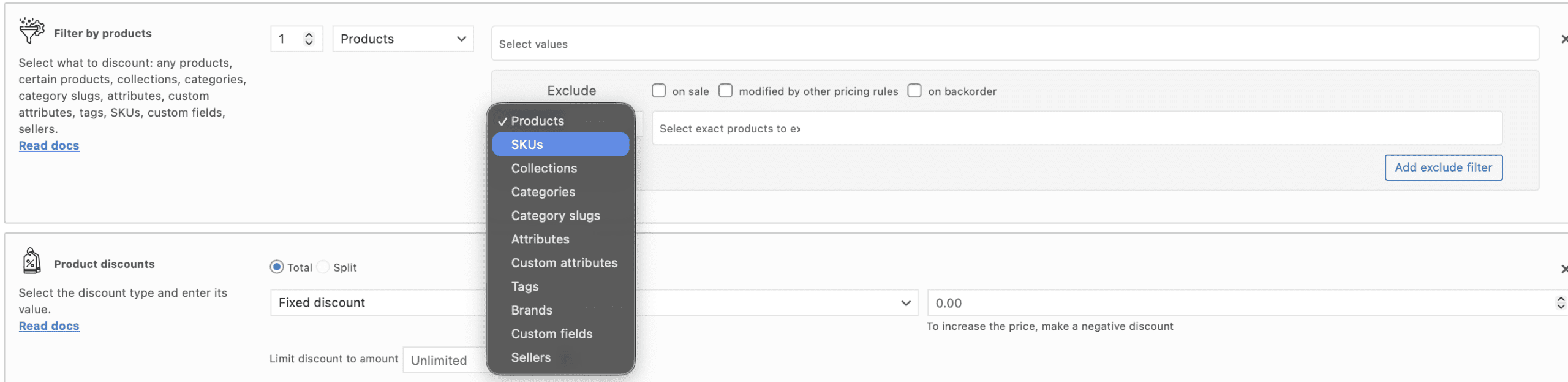
Select what to discount using product filter. Available filters:
Any products. Discount every product in the shop.
Products. Select certain products, typing a product name in the field.
Collections (PRO). Create a Product collection and discount it.
Categories. Select certain categories of the products, typing a category name in the field. Every product that have chosen category would be affected by the rule. Note: If product has 2 or more categories and there are some rules for each of it, discount would sum up.
Category slugs. Select a certain category slug, typing a slug in the field.
Attributes. Discount product with certain attribute, for example, only red products. Type the attribute name into the filter field.
Custom attributes. Discount product with custom attribute. Type the custom attribute name into the filter field.
Tags. Select a certain tag to discount that products. Type the tag name into the filter field.
SKUs. Select the SKUs of the products, typing it into the filter field.
Custom fields. Discount product with the certain custom field. Type the field name into the filter field.
Sellers. Discount products of the chosen sellers, typing the seller name into the field.
To create the discount type like “1+1”, “3=2”, please, use the “Product Set”section.
Exclude products field and adjustments
Exclude products that wouldn’t be discounted: enter the values into the field “Exclude products” or turn on one of the checkboxes:
Exclude products on sale. Exclude every product that already has a sale price.
Exclude products modified by other rules. If the product affected by another rule, it wouldn’t be discounted.
Exclude products on backorder (PRO). If the product is on backorder now, it wouldn’t be discounted.
Exclude products matched to previous filters (PRO). In case of the product bundle of the product filters, exclude every product that was matched in previous product filter. For example, you want to give a discount for one product from category “Accessories” and another one any product from the shop, but you don’t want to give a discount to the same product. Just use “Exclude product matched to previous filter” in the second product filter.
From the version 4.12.0 PRO of the plugin, you can also choose what to exclude: product, collections, categories, category slugs, attributes, custom attributes, tags, SKUs, custom fields or sellers.
Free vs PRO
Free version: Only Products and SKUs exclude filters.
PRO version: All filters and exclude options available.
Advanced Dynamic Pricing for WooCommerce product filters give you surgical precision. Discount exactly what you want. Exclude what you don’t.
Have questions?
Please submit a support request. We're always happy to help!