References
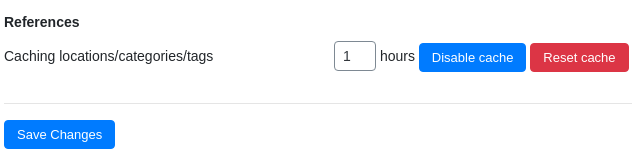
The Phone Orders for WooCommerce plugin is designed to help your agents build orders as quickly as possible. A significant part of that speed depends on how fast the interface can retrieve information such as product categories, tags, and customer locations. The References tab in the plugin’s settings addresses this performance need by providing a dedicated caching mechanism.
This guide explains what the References tab does, why caching matters for phone orders, and how to configure the cache duration for the best balance between speed and data freshness.
Note: The References settings tab is available only in the Pro version of Phone Orders for WooCommerce. The free version does not include this caching feature
The References tab contains a single but important setting: Caching locations/categories/tags. This option allows you to control how long the plugin stores certain reference data in a temporary cache.
When an agent builds a phone order, the plugin frequently needs to look up:
- Customer locations – Billing and shipping addresses, country and state selections, and other location‑related fields.
- Product categories – The hierarchical classification of products, which may be used for filtering or for applying category‑specific rules.
- Tags – Non‑hierarchical product identifiers that help agents find or categorise items.
Without caching, every time an agent types a location, opens a category dropdown, or searches for a tag, the plugin would query the database. For stores with large product catalogues or many customer records, these repeated queries can slow down the interface noticeably.
When caching is enabled, the plugin stores the results of these lookups for a predefined number of hours. Subsequent requests for the same data are served from the cache instead of querying the database again. This reduces server load and makes the phone order interface feel significantly faster, especially during busy periods.
Caching helps you accept orders faster by eliminating unnecessary database calls for reference data that does not change often.
Recommended cache durations based on your store’s update frequency:
| Store Type | Recommended Cache Duration | Reasoning |
|---|---|---|
| Stable catalogue, few changes | 24 – 48 hours | Locations, categories, and tags change rarely. Longer caching provides maximum performance. |
| Regular updates to products or categories | 6 – 12 hours | A shorter cache ensures that agents see new categories or tags within a reasonable timeframe. |
| High‑volume, fast‑changing catalogue | 1 – 4 hours | Frequent updates require a shorter cache to keep reference data fresh. |
| Troubleshooting or testing | 0 (or leave empty) | Disables caching entirely. Use this only if you suspect cache‑related issues or need immediate visibility of changes. |
Best practice: For most stores, a cache duration of 12 to 24 hours strikes the right balance between performance and data freshness. If you frequently add or rename categories and tags, consider a shorter duration.
Disabling or Resetting the Cache
The References tab does not include explicit Disable cache or Reset cache buttons. However, you can effectively disable caching by setting the duration to 0 (zero) or leaving the field empty.
To disable caching temporarily:
- Enter
0in the duration field and save the settings. The plugin will then query the database for every lookup.
To force an immediate cache refresh without waiting for the duration to expire:
- Change the cache duration to a very short period (e.g.,
1hour), save the settings, and wait one hour for the cache to expire naturally. Alternatively, set the duration to0to disable caching, then set it back to your desired value. This clears the existing cache and starts a new caching period.
Note: Unlike the Coupons settings tab, which offers dedicated Disable cache and Reset cachebuttons, the References tab relies on the duration value to control caching behaviour. This simplicity is intentional, as locations, categories, and tags change much less frequently than coupon codes.