Pricing Rules [pro]
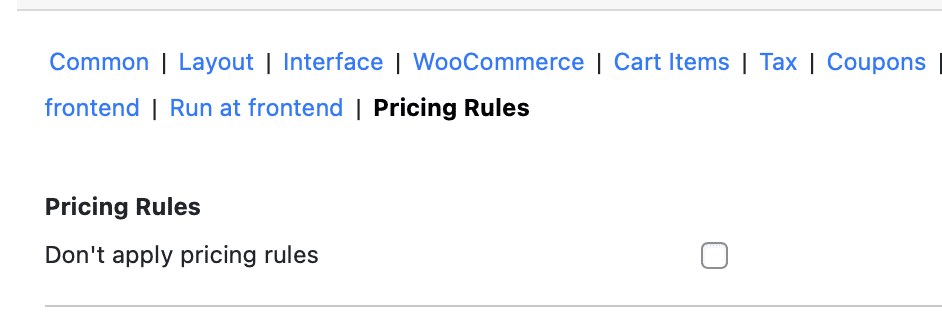
The Phone Orders for WooCommerce plugin is designed to make manual order entry fast and efficient. A critical part of this efficiency is ensuring that the same pricing rules that apply to frontend customers also apply when an agent creates an order over the phone. Without proper configuration, discounts based on user roles, purchase quantities, cart totals, or customer groups would not be reflected in manual orders.
The Pricing Rules settings tab (Pro version only) serves as the control centre for this integration. It contains the options that connect the Phone Orders plugin with a dynamic pricing solution, ensuring that every manual order respects your store’s discount logic.
Important Note: The Pricing Rules tab relies on the Advanced Dynamic Pricing for WooCommerce plugin, which is our free, dedicated discounting tool. It is not designed to work with every third‑party pricing plugin, and using incompatible tools may result in unexpected behaviour.
For dynamic pricing to function correctly in the phone order interface, two separate plugins must work together seamlessly.
The Phone Orders for WooCommerce (Pro) plugin provides the interface where agents build orders. The Advanced Dynamic Pricing for WooCommerce plugin supplies the discount logic – role‑based pricing, bulk discounts, BOGO offers, and other conditional rules.
The two plugins are designed by the same developer and are fully compatible out of the box. However, two critical settings must be enabled for the integration to work. One setting lives inside the Phone Orders plugin, and the other lives inside the Advanced Dynamic Pricing plugin.
Best Practice: If you are using a different pricing plugin (e.g., another brand’s dynamic pricing tool), the integration may not work. The Phone Orders plugin is specifically optimised to work with Advanced Dynamic Pricing for WooCommerce, which is available for free from the WordPress plugin repository.
Don’t Apply Pricing Rules option
The Pricing Rules tab also includes an advanced option labelled Don’t apply pricing rules. When enabled, this checkbox completely disables all dynamic pricing calculations for manual orders created through the Phone Orders interface.
Why this option exists:
- Troubleshooting: If you suspect that a pricing rule is causing conflicts or incorrect totals, enabling this option helps you isolate the issue. You can temporarily disable all pricing rules without deactivating the pricing plugin itself.
- Manual‑only overrides: In some workflows, agents may need to override pricing manually without interference from automated rules. Disabling pricing rules gives them full control.
- Performance optimisation: For stores with extremely complex discount logic, calculating prices in real time may slow down the phone order interface. Disabling rules can improve performance, especially if agents frequently adjust prices manually.
Warning: This setting disables all dynamic pricing rules for phone orders, including role‑based discounts, bulk discounts, and any other automatic price adjustments. Use it only when necessary.
Integration with Advanced Dynamic Pricing for WooCommerce
The Advanced Dynamic Pricing for WooCommerce plugin is the recommended discounting tool for use with Phone Orders. It is free and offers a wide range of pricing rule types.
Key capabilities of Advanced Dynamic Pricing:
- Role‑based pricing – different prices for wholesale customers, retail customers, or any custom user role.
- Bulk discounts – percentage or fixed amount discounts based on quantity or cart total.
- BOGO (Buy One Get One) offers – buy one product, get another free or at a discount.
- Time‑based promotions – discounts that apply only during specific dates or times.
- Category‑specific rules – apply discounts only to products in certain categories.
- Customer‑specific rules – create unique prices for individual customers.
All of these rule types work seamlessly with the Phone Orders plugin once the two settings described in Section 3 are enabled. The pricing rules configured in Advanced Dynamic Pricing will be applied automatically when an agent builds an order for a qualifying customer.
Note: For the most up‑to‑date information on creating pricing rules, refer to the official documentation of the Advanced Dynamic Pricing for WooCommerce plugin.