Existing Orders [pro]
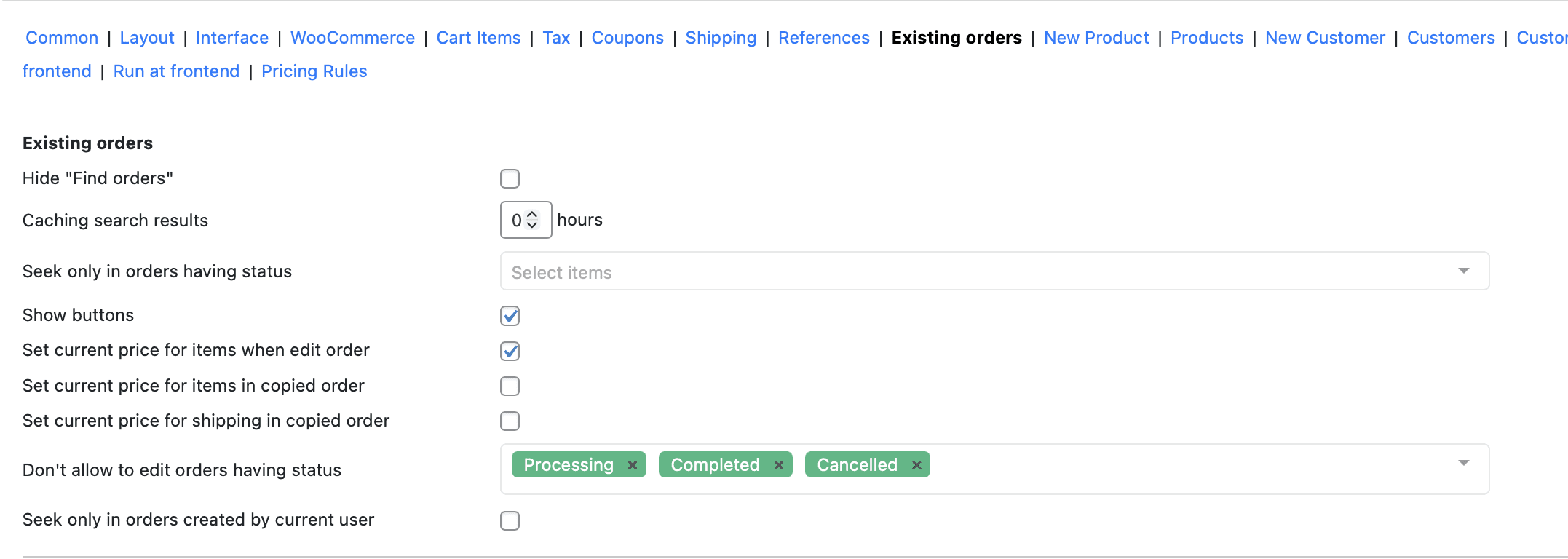
The Existing Orders tab controls how agents search for, view, edit, and copy orders already in WooCommerce. You’ll find these settings at Phone Orders → Settings → Existing Orders. Configuring them correctly keeps the order search fast and focused, prevents agents from accidentally editing orders that are already in fulfilment, and gives you control over how prices update when an existing order gets edited or duplicated.
Search Settings
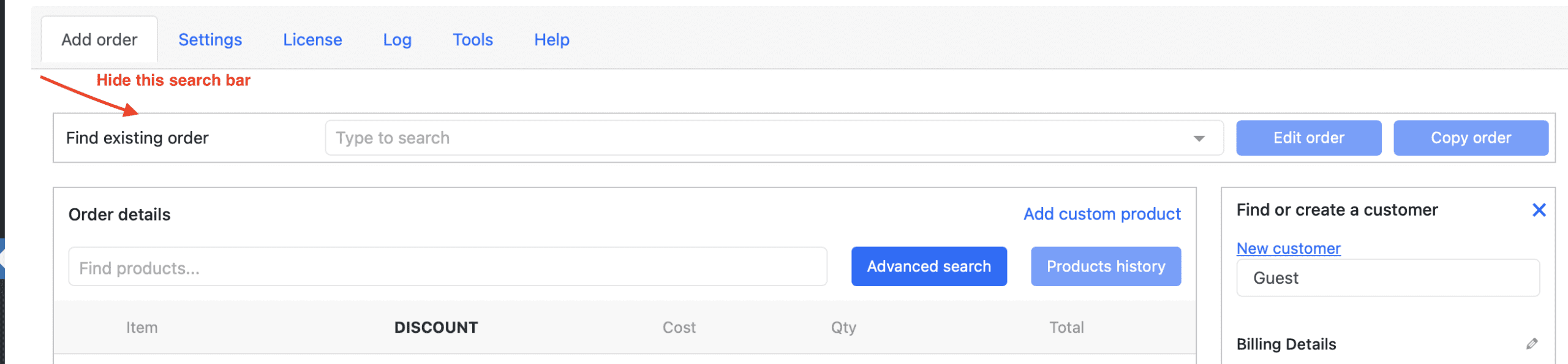
Hide “Find orders” removes the Find Orders search section from the Phone Orders interface entirely. Turn this on for agents whose role is exclusively to create new orders — hiding the section removes a distraction and keeps the interface simpler.
Caching search results sets how many hours Phone Orders caches order search results. Increasing this value speeds up repeat searches on large order databases. Set to 0 to always return live, uncached results — recommended if your order statuses change frequently and agents need to see the most current state every time they search.
Seek only in orders having status restricts the order search to orders that match one or more specific statuses you select. For example, if agents only ever look up orders that are pending payment or processing, selecting only those two statuses makes the search faster and keeps irrelevant completed or cancelled orders out of results. Leave this empty to search across all order statuses.
Seek only in orders created by current user narrows search results to orders created by the logged-in agent. Turn this on in multi-agent call centres where each agent manages their own order queue and should only see their own orders in search results — it reduces noise and speeds up lookup during a call.
Edit and Copy Settings
Show buttons adds Edit order and Copy order action buttons to each order in the search results. Without these buttons, agents can only view order details from the Find Orders panel. Turn this on when your workflow requires agents to modify or duplicate orders directly from Phone Orders rather than navigating to the WooCommerce admin orders screen.

Set current price for items when editing an order recalculates all product prices to their current live price when an agent opens an existing order to edit it. Turn this on when your prices change regularly and you want edited orders to always reflect today’s pricing rather than the price the customer originally paid. Leave it off when agents must honour the original order price — for example when editing an order to correct an address without changing what the customer owes.
Set current price for items in copied order applies the same live price recalculation when an agent copies an existing order using the Copy order button. The copied order starts with current prices rather than the original order’s prices. Use this for repeat orders where the customer wants the same products but at today’s price — for example a standing monthly order that needs to reflect current pricing each time it runs.
Set current price for shipping in copied order updates the shipping cost to the current rate when an agent copies an order. Turn this on alongside the previous setting when your shipping rates change frequently and copied orders should always use the current rate rather than the original order’s shipping cost.
Don’t allow to edit orders having status lets you select one or more order statuses that agents cannot open for editing. For example, selecting Completed and Shipped prevents agents from accidentally modifying orders already in fulfilment. Phone Orders shows these orders in search results but blocks the Edit order action for them, protecting your fulfilment workflow from unintended changes.
Settings Summary
| Setting | Default | Turn ON / Set when… |
|---|---|---|
| Hide “Find orders” | OFF | Agents only create new orders and don’t need to search existing ones |
| Caching search results | 0 | You have a large order database and want faster search |
| Seek only in orders having status | All | You want to restrict search to specific order statuses |
| Seek only in orders by current user | OFF | Each agent manages their own order queue |
| Show buttons | OFF | Agents need to edit or copy orders from Phone Orders |
| Set current price when editing | OFF | Edited orders should always use today’s product prices |
| Set current price in copied order | OFF | Copied orders should always use today’s product prices |
| Set current shipping in copied order | OFF | Copied orders should always use today’s shipping rates |
| Don’t allow editing by status | None | You want to lock orders in certain statuses from agent edits |