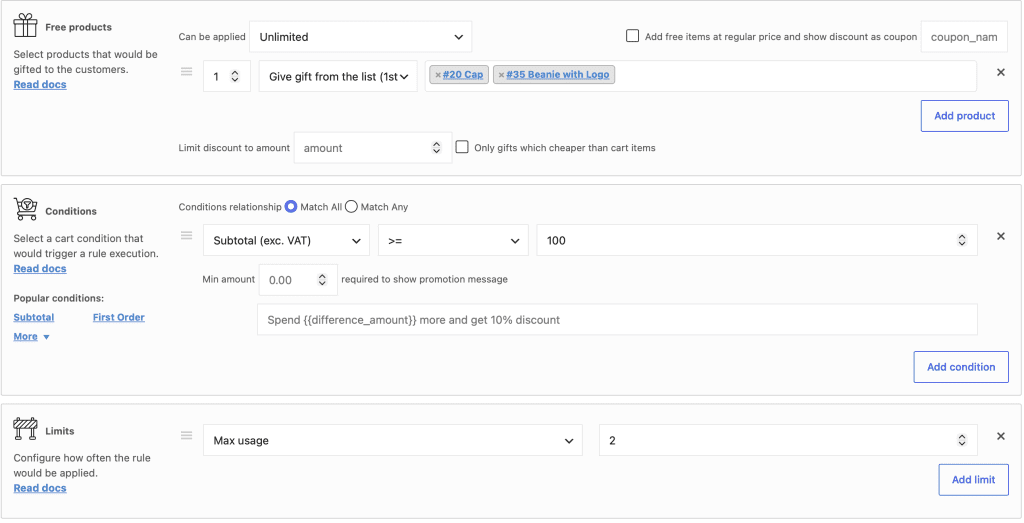
The Limits section allows you to control how many times a discount rule can apply. This feature prevents a single promotion from being used indefinitely, which is essential for limited‑time offers, budget‑controlled campaigns, or exclusive deals for early customers.
You can set two types of limits:
Max usage – restricts the total number of times the rule applies across all customers.
Max usage per customer – limits how many times a specific logged‑in customer can benefit from the rule. (Pro feature)
1. Max Usage (Global Limit)
What it does The global limit stops the rule after it has been applied a certain number of times. You define the maximum number of applications. Once the rule reaches that number, the plugin stops applying it to new orders.
When to use it
Promotional campaigns with a fixed number of redemptions (e.g., “First 50 customers get 20% off”).
Marketing offers that must stay within a strict budget.
Any scenario where you need to control the total exposure of the discount.
Example You create a rule that gives a 20% discount on a specific product. You set Max usage to 2.
Customer A buys the product → the rule applies (1 usage).
Customer B buys the product → the rule applies (2 usages).
Customer C tries to buy the product → the rule no longer applies. The product returns to its full price.
The rule remains active in your rules list, but it no longer affects any order.
2. Max Usage per Customer (Pro Feature)
What it does This limit restricts how many times a logged‑in customer can benefit from the same rule. The plugin tracks usage per customer account. Guest customers (not logged in) are not tracked for this limit.
When to use it
Exclusive deals for returning customers (e.g., “One‑time 15% discount for your next purchase”).
Preventing a single customer from abusing a generous promotion.
Loyalty programmes where each customer can use a special discount only once.
Example You create a rule that gives a free gift for any order over $100. You set Max usage per customer to 1.
Customer A places an order over $100 → the rule applies (1 usage).
Customer A later places another order over $100 → the rule does not apply again.
Customer B (a different customer) places an order over $100 → the rule applies (1 usage).
Important: This limit only works for existing users (customers with a WordPress account). Guest customers are not tracked, so the limit does not apply to them.
3. How to Use the Limits Section
Open the rule you want to edit.
Scroll down to the Limits section.
For Max usage, enter a number (e.g., 2).
For Max usage per customer (Pro), enter a number.
Save the rule.
Note: Leave the field empty to apply no limit.
4. Practical Example: “Only First 2 Customers Get a Discount”
Imagine a promotion: “The first two customers who order a polo shirt receive a 20% discount.”
Rule configuration:
Rule type: Product Discount.
Products: Polo shirt (select the product).
Discount: 20% off.
Max usage: 2.
What happens:
Order sequence
Discount applied?
Remaining usage count
Customer 1 buys the polo
✅ Yes
1 left
Customer 2 buys the polo
✅ Yes
0 left
Customer 3 buys the polo
❌ No
–
After the second order, the rule stops applying. Any later customer pays the full price. The rule remains in your list but no longer affects any order.
5. Important Notes
The plugin applies limits in real time. As soon as a qualifying order reaches the limit, the rule stops affecting subsequent orders.
You can combine both limits in the same rule. For example, a rule could apply at most 100 times globally and at most 2 times per customer.
The Max usage per customer limit applies to logged‑in users only. Guest customers are not counted.
The plugin counts every successful application of the rule. Even if a customer later cancels the order, the usage count does not automatically decrease. You must manually adjust it if needed.
The limit counters reset only when you manually change the number or disable the rule.
6. Best Practices
Test the limit with a low number first. Set Max usage to 1 and verify the rule stops working after one order. This ensures the limit behaves as you expect.
Use clear naming. If a rule has a limit, mention it in the rule name (e.g., “First 50 customers – 20% off”).
Monitor usage regularly. Use the Statistics module (Pro) to track how many times your limited rules have applied.
Be careful with guest customers. The per‑customer limit does not track guests. For promotions that must be strictly one per person, require customer login before checkout.
7. Summary
Limit Type
Scope
Availability
Use Case
Max usage
Global, across all customers.
Free + Pro
“First 100 customers get a discount.”
Max usage per customer
Per logged‑in customer.
Pro only
“One‑time welcome discount for new customers.”
The Limits section gives you precise control over how many times a discount applies. Use global limits for budget‑controlled campaigns and per‑customer limits for exclusive, single‑use offers.
Have questions?
Please submit a support request. We're always happy to help!